Posts

Showing posts with the label Facebook Newsfeed

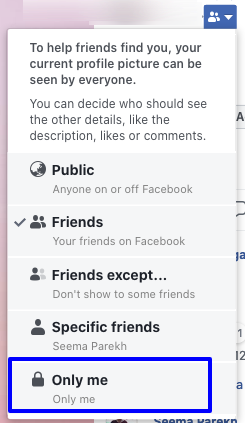
How to lock your profile picture on Facebook so no one can like or comment, just view.
Image
You can lock your Facebook profile picture so that it can only be viewed and no one can like, comment or download it. Here are the steps to achieve this: Login to your Facebook account Goto your profile page. You can do this in following ways depending on your platform: For Desktop Facebook: By clicking on your name on the top right if you are on Desktop. For Mobile Facebook: By clicking on three horizontal lines on the top right and then clicking on your name if you are on Mobile App of Facebook. Now, Click on your profile picture. It will open in a picture viewer of Facebook. On the right side below your name, near the date, there will be a symbol (by default the globe symbol). Click on this globe symbol, a drop-down of "Who should see this ?" will appear. From this d...

Facebook not showing All updates of your Friends ? Here’s how you can solve the problem

Image
Wondering why you didn’t see that image/status from your friend on your News Feed ? Here’s the answer: When the Facebook Smart Lists & Timeline were introduced, these changes affected the News Feed too. Facebook now comes with an option to view 3 types of updates from your friends: All Updates Most Updates Only Important Updates All Updates -   This will be selected automatically if you have listed the friend in your “Close Friends” list. “All Updates” will show you every single update from your friend, including the third-party posts they like/comment, their game updates, etc. Clearly, this is nothing but a headache if your friend is too active on Facebook. Most Updates -  This is selected By Default for all your friends(Except ofcourse your Close Friends) and is the  main Culprit why you miss some of the updates from your friends. Only Important -  This includes life-events, photos and popular statuses. Popular Status is a status...